> ## Documentation Index
> Fetch the complete documentation index at: https://docs.ai21.com/llms.txt
> Use this file to discover all available pages before exploring further.
# MCP Server Setup
## Building an Employee Server with FastMCP
This guide walks you through creating a Python-based MCP server that represents an employee management system. Using AI21 Maestro, you will be able to ask questions about your departments and employees. We’ll expose it remotely with ngrok and call it using AI21 Maestro.
## Prerequisites
* Python 3.10+
* ngrok account (free tier works)
* AI21 Maestro platform access
## Step 1: Create the MCP Server
### 1.1 Install uv and initialize the project
`uv` is a modern, extremely fast Python package and project manager.\
First, let’s install `uv` and set up our Python project and environment:
```bash theme={"system"}
curl -LsSf https://astral.sh/uv/install.sh | sh
```
Now let’s initialize the project:
```bash theme={"system"}
# Create a new directory for our project
uv init employee-server
cd employee-server
# Create virtual environment and activate it
uv venv
source .venv/bin/activate
```
Install dependencies:
```bash theme={"system"}
uv add fastmcp
```
### 1.2 Create the Server File
In the `employee-server` directory, create a file named `employee_server.py`:
```python theme={"system"}
from fastmcp import FastMCP
from typing import Dict, Optional
# Initialize FastMCP server
mcp = FastMCP("Employee Knowledge Base")
# Sample employee data (in production, this would come from a database)
EMPLOYEE_DATA = {
"EMP001": {
"name": "Alice Johnson",
"department": "Engineering",
"role": "Senior Developer",
"salary": 120000,
"email": "alice.johnson@company.com",
"manager": "EMP005"
},
"EMP002": {
"name": "Bob Smith",
"department": "Sales",
"role": "Sales Manager",
"salary": 95000,
"email": "bob.smith@company.com",
"manager": "EMP006"
},
"EMP003": {
"name": "Carol White",
"department": "HR",
"role": "HR Specialist",
"salary": 75000,
"email": "carol.white@company.com",
"manager": "EMP007"
},
"EMP004": {
"name": "David Brown",
"department": "Engineering",
"role": "Junior Developer",
"salary": 80000,
"email": "david.brown@company.com",
"manager": "EMP005"
},
"EMP005": {
"name": "Eva Martinez",
"department": "Engineering",
"role": "Engineering Manager",
"salary": 150000,
"email": "eva.martinez@company.com",
"manager": "EMP008"
}
}
@mcp.tool()
def get_employee_by_id(employee_id: str) -> Dict:
"""
Retrieve employee information by their ID.
Args:
employee_id: The unique employee identifier (e.g., EMP001)
Returns:
Employee information including name, department, role, and salary
"""
if employee_id in EMPLOYEE_DATA:
return {
"success": True,
"data": EMPLOYEE_DATA[employee_id]
}
else:
return {
"success": False,
"error": f"Employee with ID {employee_id} not found"
}
@mcp.tool()
def search_employee_by_name(name_query: str, max_results: Optional[int] = 10) -> Dict:
"""
Search for employees by name using fuzzy matching.
Args:
name_query: The name or partial name to search for
max_results: Maximum number of results to return (default: 10)
Returns:
List of employees matching the name query, sorted by relevance
"""
if not name_query.strip():
return {
"success": False,
"error": "Name query cannot be empty"
}
query = name_query.lower().strip()
matches = []
for emp_id, emp_data in EMPLOYEE_DATA.items():
employee_name = emp_data["name"].lower()
score = 0
# Exact match gets highest score
if query == employee_name:
score = 100
# Check if query is contained in name
elif query in employee_name:
score = 80
# Check if all words in query are in name
elif all(word in employee_name for word in query.split()):
score = 60
# Check if any word in query matches any word in name
elif any(word in employee_name for word in query.split()):
score = 40
# Check if name starts with query
elif employee_name.startswith(query):
score = 70
# Check for partial word matches
else:
query_words = query.split()
name_words = employee_name.split()
partial_matches = 0
for q_word in query_words:
for n_word in name_words:
if q_word in n_word or n_word in q_word:
partial_matches += 1
break
if partial_matches > 0:
score = 20 + (partial_matches * 10)
if score > 0:
matches.append({
"id": emp_id,
"score": score
})
# Sort by score (highest first)
matches.sort(key=lambda x: x["score"], reverse=True)
# Limit results
if max_results:
matches = matches[:max_results]
return {
"success": True,
"query": name_query,
"count": len(matches),
"employee_ids": [match["id"] for match in matches]
}
@mcp.tool()
def search_employees_by_department(department: str) -> Dict:
"""
Search for all employees in a specific department.
Args:
department: The department name to search for
Returns:
List of employees in the specified department
"""
employees = []
for emp_id, emp_data in EMPLOYEE_DATA.items():
if emp_data["department"].lower() == department.lower():
employees.append({
"id": emp_id,
**emp_data
})
return {
"success": True,
"count": len(employees),
"employees": employees
}
@mcp.tool()
def get_salary_range(min_salary: Optional[int] = None, max_salary: Optional[int] = None) -> Dict:
"""
Find employees within a specific salary range.
Args:
min_salary: Minimum salary threshold (optional)
max_salary: Maximum salary threshold (optional)
Returns:
List of employees within the specified salary range
"""
employees = []
for emp_id, emp_data in EMPLOYEE_DATA.items():
salary = emp_data["salary"]
if (min_salary is None or salary >= min_salary) and \
(max_salary is None or salary <= max_salary):
employees.append({
"id": emp_id,
"name": emp_data["name"],
"department": emp_data["department"],
"salary": salary
})
# Sort by salary
employees.sort(key=lambda x: x["salary"], reverse=True)
return {
"success": True,
"count": len(employees),
"employees": employees
}
@mcp.tool()
def get_employee_hierarchy(employee_id: str) -> Dict:
"""
Get the reporting hierarchy for an employee.
Args:
employee_id: The employee ID to get hierarchy for
Returns:
The employee's manager and any direct reports
"""
if employee_id not in EMPLOYEE_DATA:
return {
"success": False,
"error": f"Employee with ID {employee_id} not found"
}
employee = EMPLOYEE_DATA[employee_id]
# Find manager
manager = None
if employee.get("manager") and employee["manager"] in EMPLOYEE_DATA:
manager = {
"id": employee["manager"],
"name": EMPLOYEE_DATA[employee["manager"]]["name"],
"role": EMPLOYEE_DATA[employee["manager"]]["role"]
}
# Find direct reports
direct_reports = []
for emp_id, emp_data in EMPLOYEE_DATA.items():
if emp_data.get("manager") == employee_id:
direct_reports.append({
"id": emp_id,
"name": emp_data["name"],
"role": emp_data["role"]
})
return {
"success": True,
"employee": {
"id": employee_id,
"name": employee["name"],
"role": employee["role"]
},
"manager": manager,
"direct_reports": direct_reports
}
@mcp.tool()
def get_department_statistics() -> Dict:
"""
Get statistics for all departments including employee count and average salary.
Returns:
Statistics for each department
"""
dept_stats = {}
for emp_data in EMPLOYEE_DATA.values():
dept = emp_data["department"]
if dept not in dept_stats:
dept_stats[dept] = {
"count": 0,
"total_salary": 0,
"employees": []
}
dept_stats[dept]["count"] += 1
dept_stats[dept]["total_salary"] += emp_data["salary"]
dept_stats[dept]["employees"].append(emp_data["name"])
# Calculate averages
result = {}
for dept, stats in dept_stats.items():
result[dept] = {
"employee_count": stats["count"],
"average_salary": stats["total_salary"] / stats["count"],
"total_salary": stats["total_salary"],
"employees": stats["employees"]
}
return {
"success": True,
"departments": result
}
# Run the server
if __name__ == "__main__":
mcp.run(transport="streamable-http", path="/mcp", port=8000)
```
### 1.3 Run the Local Server in development mode
```bash theme={"system"}
python employee_server.py
```
Your server should now be running at \[http\://localhost:8000.]\([http://localhost:8000.\\)\\\\](http://localhost:8000.\\\)\\\\) Test it by visiting [http://localhost:8000/mcp](http://localhost:8000/mcp) and getting the following response:
```bash theme={"system"}
{"jsonrpc":"2.0","id":"server-error","error":{"code":-32600,"message":"Not Acceptable: Client must accept text/event-stream"}}
```
###
## Step 2: Test the MCP Server
Now we will test that the server is running and that it adheres to the Model Context Protocol correctly by listing its tools.
We will use the [MCP Inspector](https://github.com/modelcontextprotocol/inspector) tool which creates a locally running MCP client along with a user facing web interface.
### 2.1 Run the MCP Inspector
In a different terminal run the following command:
```bash theme={"system"}
npx @modelcontextprotocol/inspector@latest
```
You should see the following output:
```bash theme={"system"}
⚙️ Proxy server listening on localhost:6277
🔑 Session token:
Use this token to authenticate requests or set DANGEROUSLY_OMIT_AUTH=true to disable auth
🚀 MCP Inspector is up and running at:
```
Copy the session token from this output.
### 2.2 List your server tools
Open the browser in `http://localhost:6274/`and you should see the Inspector UI.
1. Choose Streamable HTTP as the Transport Type
2. Set the URL to `http://localhost:8000/mcp`
3. Go to the **Configuration** pane and paste the `` in the Proxy Session Token textbox
4. Click on the **Connect** button
5. Select Tools and then click on “List Tools”
6. You should see a list of all the tools your server exposes
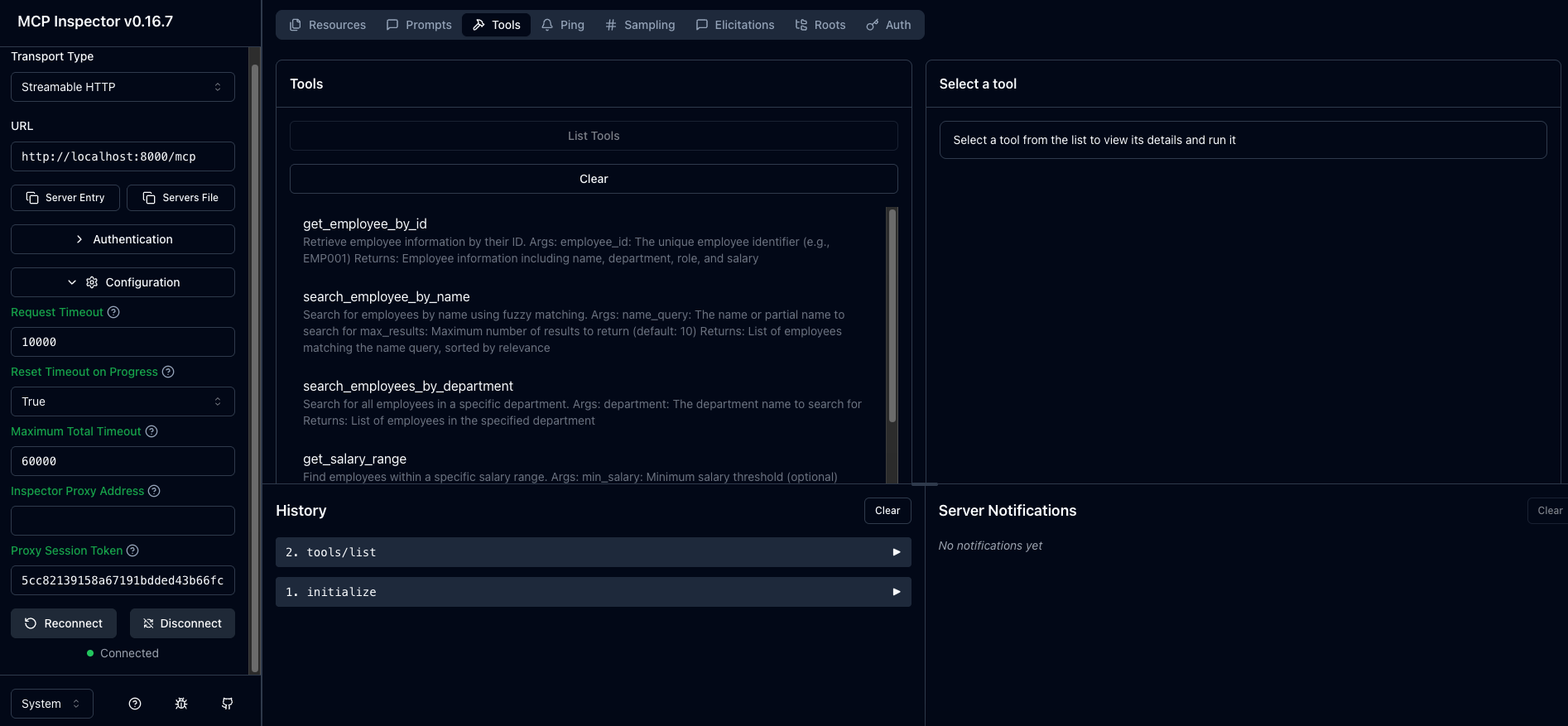 7. **Optional**: you can interact with each tool by clicking its name in the list and providing the required parameters
## Step 3: Expose Server with ngrok
### 2.1 Install ngrok
Download ngrok from [ngrok.com](https://ngrok.com/download) and create a free account.
### 2.2 Start ngrok Tunnel
```bash theme={"system"}
ngrok http 8000
```
You'll get a publicly accessible URL like: `https://abc123.ngrok-free.app`
**Important**: Save this URL, you'll need it for AI21 Maestro integration.
Test the URL by making a request to `https://abc123.ngrok-free.app/mcp` . and getting You should get the following response:
```bash theme={"system"}
{"jsonrpc":"2.0","id":"server-error","error":{"code":-32600,"message":"Not Acceptable: Client must accept text/event-stream"}}
```
## Step 4: Integrate with AI21 Maestro
### 4.1 Run with AI21 Maestro
In your AI21 Maestro configuration, add the remote MCP server:
```python theme={"system"}
import asyncio
from ai21 import AsyncAI21Client
client = AsyncAI21Client(api_key="")
async def main():
run = await client.beta.maestro.runs.create_and_poll(
input="Who reports to Eva Martinez?",
tools=[
{
"type": "mcp",
"server_url": "https://.ngrok-free.app/mcp",
"server_label": "Employees",
},
],
budget="medium",
)
print("id:", run.id)
print("Status:", run.status)
print("Result:", run.result)
# Works in Jupyter
await main()
# Comment the above and uncomment the below to run in Python scripts
# import asyncio
# asyncio.run(main())
```
You should get the following response:
```
id: 068c664b-f9ea-7078-8000-be3f80ffa83c
Result: Eva Martinez, who is an Engineering Manager, has the following direct reports:
1. Alice Johnson - Senior Developer
2. David Brown - Junior Developer
```
### 4.2 Test in AI21 Maestro
Example queries to test in AI21 Maestro:
1. "What is the salary of employee EMP001?"
2. "Show me all employees in the Engineering department"
3. "Who reports to EMP005?"
4. "What are the department statistics?"
7. **Optional**: you can interact with each tool by clicking its name in the list and providing the required parameters
## Step 3: Expose Server with ngrok
### 2.1 Install ngrok
Download ngrok from [ngrok.com](https://ngrok.com/download) and create a free account.
### 2.2 Start ngrok Tunnel
```bash theme={"system"}
ngrok http 8000
```
You'll get a publicly accessible URL like: `https://abc123.ngrok-free.app`
**Important**: Save this URL, you'll need it for AI21 Maestro integration.
Test the URL by making a request to `https://abc123.ngrok-free.app/mcp` . and getting You should get the following response:
```bash theme={"system"}
{"jsonrpc":"2.0","id":"server-error","error":{"code":-32600,"message":"Not Acceptable: Client must accept text/event-stream"}}
```
## Step 4: Integrate with AI21 Maestro
### 4.1 Run with AI21 Maestro
In your AI21 Maestro configuration, add the remote MCP server:
```python theme={"system"}
import asyncio
from ai21 import AsyncAI21Client
client = AsyncAI21Client(api_key="")
async def main():
run = await client.beta.maestro.runs.create_and_poll(
input="Who reports to Eva Martinez?",
tools=[
{
"type": "mcp",
"server_url": "https://.ngrok-free.app/mcp",
"server_label": "Employees",
},
],
budget="medium",
)
print("id:", run.id)
print("Status:", run.status)
print("Result:", run.result)
# Works in Jupyter
await main()
# Comment the above and uncomment the below to run in Python scripts
# import asyncio
# asyncio.run(main())
```
You should get the following response:
```
id: 068c664b-f9ea-7078-8000-be3f80ffa83c
Result: Eva Martinez, who is an Engineering Manager, has the following direct reports:
1. Alice Johnson - Senior Developer
2. David Brown - Junior Developer
```
### 4.2 Test in AI21 Maestro
Example queries to test in AI21 Maestro:
1. "What is the salary of employee EMP001?"
2. "Show me all employees in the Engineering department"
3. "Who reports to EMP005?"
4. "What are the department statistics?"